Google Sign-In Required

Use your company Google account to access the BetterFleet private content.

Back to private home

BetterFleet Support Private
Skip to content
BetterFleet Dev Wiki
Staging Hotfix Release
Initializing search
    bf-dev
    • Home
    • Process
    • Products
    • Reference
    • Decisions
    • Work
    • Operations
    bf-dev
    • Home
      • Process Handbook
      • BetterFleet Workflow Map
      • Product Development System
      • Product Engineering Workflow
        • Process Workflows
        • Work Intake and Weekly Planning
        • Product Engineering Workflow in Linear
        • Product Engineering Delivery
        • Agent Guidance
        • Workflow
        • Skills
        • Skill Sources
        • Process Guides
        • GitLab Feature Flags
        • In-App Docs Authoring
        • Release Notes
        • Process Templates
        • Release Plan: <title>
      • Process Publishing
      • Product overview
        • General Reference
          • Core Domain Training
          • System Topology
          • Two-Axis Ontology Model
          • Ontology Primer
          • Worked Example
          • Evidence, Ownership, and Lineage
          • Energy Management
          • Standards and Protocol Map
          • Charging, Roaming, and Commercial Model
          • Charge Planning and Operations
          • Cross-Cutting Domains
          • Domain Coverage Matrix
        • BetterFleet Product Ontology
        • Core Operations Data Ontology
        • BetterFleet R&D Plan
        • Index
        • Architecture
        • Manage Product Capabilities
        • Manage Data and State
        • Manage Service Interaction Flows
        • Manage Reference
        • Manage Internal Application Diagrams
          • Manage Authorization And Permissions
          • bf-manage-core Auth and Authorization Model
          • Manage Authorization and Permissions
          • bf-manage-web Auth and Permission Model
          • Manage Service Catalog
          • bf-depot-sim
          • bf-digital-twin (Manage Role)
          • bf-fleet-health
          • bf-manage-connect
          • bf-manage-core
          • bf-manage-incidents
          • bf-manage-roaming
          • bf-manage-sitepwrmon
          • bf-manage-web
          • bf-schedule-creator (Manage Role)
          • bf-support-microsite
          • bf-telematics
        • Index
        • Architecture
        • Plan Reference
        • Plan Internal Application Diagrams
        • Plan Migration and Flags
        • Plan Simulation Request Lifecycle
          • Plan Service Catalog
          • bf-bnl-schedule-analysis-compute
          • bf-bnl-settings
          • bf-bnl-ui
          • bf-digital-twin (Plan Role)
          • bf-route-modelling
          • bf-schedule-creator (Plan Role)
      • Where to Ask Product Questions
      • Reference
        • Platform Reference
        • Platform Architecture
        • Script Runtime Model
        • Compose Profiles and Modes
        • Repository Map
        • Monolithic Git Transition FAQ
        • Monolithic Git Sizing
        • CI and Release Integration
        • Shared Reference
        • Shared Infrastructure Architecture
        • Secrets and Env Strategy
        • Vendors and Local Dependencies
        • System Reference
        • Cloud Data Dependencies
        • Ports and URLs
        • Service Matrix
          • API Docs
          • OCPI API Docs
          • OCPP API Docs
          • OSCP API Docs
          • VDV API Docs
          • Yard State API Docs
        • System Design
        • System Design: BBA Microgrid Controller Generic Packet Translation
        • System Design: Depot Simulation
        • System Design: IoT Sensor Packet
        • System Design: Microgrid Energy Orchestration
          • System Design: OCPP Profile 3 And ISO 15118 PKI
          • Architecture: BetterFleet OCPP Profile 3 and ISO 15118 PKI
          • Specification: BetterFleet OCPP Profile 3 and ISO 15118 Certificate Lifecycle Management
          • System Design: On-Prem Control
          • Challenge
          • Specification: BetterFleet On-Prem Continuity Control
          • System Design: OSCP
          • OSCP Protocol Documentation
          • Depot Sim Testing Requirements
          • System Design: OSCP Flexibility Provider Domain
      • Decisions
        • Architecture Decision Records
        • 0001 - Record architecture decisions
        • 0002 - Cognito for Authentication and Authorisation
        • 0003 - AWS Amplify for Authentication
        • 0004 - DynamoDB for default database
        • 0005 - Data Persistence
        • 0006 - Trunk-Based Development
        • 0007 - Generalised principle for automation
        • 0008 - Naming Repositories, Services, and URLs
        • 0009 - Use Timezone Aware DateTimes and UTC
        • 0010 - Use semantic release
        • 0011 - Centralized feature flag repository
        • 0012 - Use Named Exports in Storybook
        • 0013 - RESTful TITLE GraphQL
        • 0014 - Service Granularity
        • 0015 - Async/co-routine exception handling pattern
        • 0016 - Logging & log levels
        • 0017 - Instantiated Models
        • 0018 - Repository Pattern for Database Access
        • 0019 - Use of Design Tokens in TypeScript React Application
        • 0020 - API backwards compatibility and versioning
        • 0021 - Alembic Migration strategy
        • 0022 - Consistent react-hook-form usage
        • 0023 - Domain Event-Driven Architecture
        • 0024 - Domain Event Bus Tech Stack
        • 0025 - No enum types in DB table columns
        • 0026 - In-Memory Ormar Stores for Repository testing
        • 0027 - Storing Tab State in Query and Local Storage
        • 0028 - Adopt OpenTelemetry Semantic Conventions for Structured Logging
        • 0029 - Adopt RFC 9457 for HTTP Error Responses
        • 0030 - Use GitLab registry and Terraform state for ECS services
        • 0031 - Adopt DDD, Hexagonal Architecture, and CQRS for Python Domain Services
      • Work
        • Active Work
          • Work: Bba Microgrid Controller
          • Implementation Specification: BBA Microgrid Controller
          • BBA Microgrid Controller Deliverables (Stories)
          • Work: BFDev Monolithic Git
          • Challenge
          • Specification: BFDev Monolithic Git v2
          • BFDev Monolithic Git v2 Stories
          • Work: Complex Circuit Load Balancing
          • Implementation Specification: Complex Circuit Load Balancing
          • Complex Circuit Load Balancing Deliverables (Stories)
            • COR-10 and COR-11 Consolidation Review
          • Work: Dispatch Reliability and Reconciliation
          • Challenge
          • Specification: Dispatch Reliability and Reconciliation
          • Dispatch Reliability and Reconciliation (Unit User Stories)
            • Dispatch populated vehicle cards grey surface snapshot
            • Dispatch Visual Review
          • Work: Enable Scheduled Managed Charger Access
          • Challenge: Enable Scheduled Managed Charger Access
          • Specification Exploration Dossier: Enable Scheduled Managed Charger Access
          • Specification Review: Enable Scheduled Managed Charger Access
          • Specification: Enable Scheduled Managed Charger Access
          • Work: Guided Cut-Off and Release Orchestration
          • Specification: Guided Cut-Off and Release Orchestration
          • Guided Cut-Off and Release Orchestration (Unit User Stories)
          • Work: Production Deployment Validation
          • Challenge
          • Work: Scheduled Report Parity
          • Specification: Scheduled Report Parity
          • Work: Telematics
          • Telematics EventBridge Path
          • Telematics Ingress Architecture
          • Specification: Telematics Migration into bf-manage-core with 5-Minute Freshness and Health Visibility
          • Telematics Core Migration MVP (Implementation-Time BDD)
          • Work: Vector Derms
          • Implementation Specification: Vector DERMS
          • Vector DERMS Deliverables (Stories)
          • Work: Visiting Vehicle Charging Visibility
          • Specification: Visiting Vehicle Charging Visibility
          • Visiting Vehicle Charging Visibility (Unit User Stories)
          • Work: Workspace Owned Stripe Roaming
          • Specification: Workspace-Owned Stripe Credentials for Roaming Payments
        • Backlog Work
          • Work: Microgrid
          • Microgrid Backlog Stories
          • Work: Mobile Ops Companion
          • Challenge
          • Specification: Mobile Operations Companion v1
          • Mobile Operations Companion Deliverables (Stories)
          • Work: Oscp
          • OSCP Backlog Stories
        • Archived Work
          • Work: Code Canonical Orchestration
          • Challenge
          • Specification: Product Engineering Workflow
          • Product Engineering Workflow Deliverables (Unit User Stories)
          • Work: Release Notes Automation
          • Release Plan: Release Notes Automation
          • Release Notes Automation Backlog Stories
      • Operations
      • Onboarding Runbook
        • Operations Runbooks
        • Production Hotfix Release
        • Staging Hotfix Release
          • 3AM Quick Guide
          • Purpose And When To Use It
          • Prerequisites And Permissions
          • Normal Procedure
          • Reference Screenshots
            • Steps 2 And 3: Cherry-Pick The Merged Hotfix Into release
            • Steps 4 And 5: Start The Guided Release Invocation
            • Steps 6 And 7: Confirm The Staging Deploy And Validate The Result
          • Decision Points And Exceptions
          • Validation And Evidence
          • Rollback And Recovery
          • Links To Service-Specific Details
        • Manage Staging Release Validation
        • Terraform Plan Dry Runs
        • Operations Tooling
        • Code Indexing
        • Operations Evidence
        • Database Restoration Test Report
      • Daily Operations Runbook
      • Testing Guide
      • Troubleshooting
    • 3AM Quick Guide
    • Purpose And When To Use It
    • Prerequisites And Permissions
    • Normal Procedure
    • Reference Screenshots
      • Steps 2 And 3: Cherry-Pick The Merged Hotfix Into release
      • Steps 4 And 5: Start The Guided Release Invocation
      • Steps 6 And 7: Confirm The Staging Deploy And Validate The Result
    • Decision Points And Exceptions
    • Validation And Evidence
    • Rollback And Recovery
    • Links To Service-Specific Details
    1. Home
    2. Operations
    3. Runbooks
    Operations general

    Staging Hotfix Release

    3AM Quick Guide

    • Use this when you need one merged hotfix in staging outside the normal cut-off flow.
    • Cherry-pick the merged hotfix into release and confirm only the intended hotfix landed there.
    • Open the orchestration pipeline and set action=deploy-release-branch-to-staging, project=<target repository>, and confirm=true: https://gitlab.com/evenergi/develop/-/pipelines/new
    • Do not choose bring-all-code-to-release-branch. That action rebuilds release from the default branch, which is not the right path for a selective hotfix.
    • Watch the staging deploy through completion, run the hotfix-specific checks, and record what was validated.
    • For governed delivery work, add the Validated in Staging label after the checks pass.

    Purpose And When To Use It

    This runbook explains how to promote a merged hotfix into the release branch and trigger the staging release flow for a specific repository.

    Use this workflow when an urgent fix must be deployed to staging outside the normal cut-off cadence, or when the current staging candidate needs an extra fix before production validation completes.

    Do not use this workflow for the normal weekly cut-off, for unrelated feature promotion, or when the target repository already documents a different service-specific staging process.

    Prerequisites And Permissions

    Before using this workflow:

    • the hotfix merge request must already be merged and approved for staging
    • you must know which repository or service needs the hotfix
    • you must have permission to cherry-pick into the release branch, or push a corrected release branch if the GitLab UI path is unavailable
    • you must have permission to create and run the orchestration pipeline for the target repository
    • you must know where the target service exposes staging deployment status, logs, and health checks
    • you must have the test or smoke-check steps needed to validate the fix in staging

    In the current BetterFleet setup, operators typically create the orchestration pipeline from:

    • https://gitlab.com/evenergi/develop/-/pipelines/new

    For a selective staging hotfix, use these guided inputs:

    • action=deploy-release-branch-to-staging
    • project=<target repository>
    • confirm=true

    Normal Procedure

    1. Confirm the hotfix is ready for staging promotion. Check that the merge request is merged, that the change is the right scope for staging, and that any downstream services affected by the fix are known.
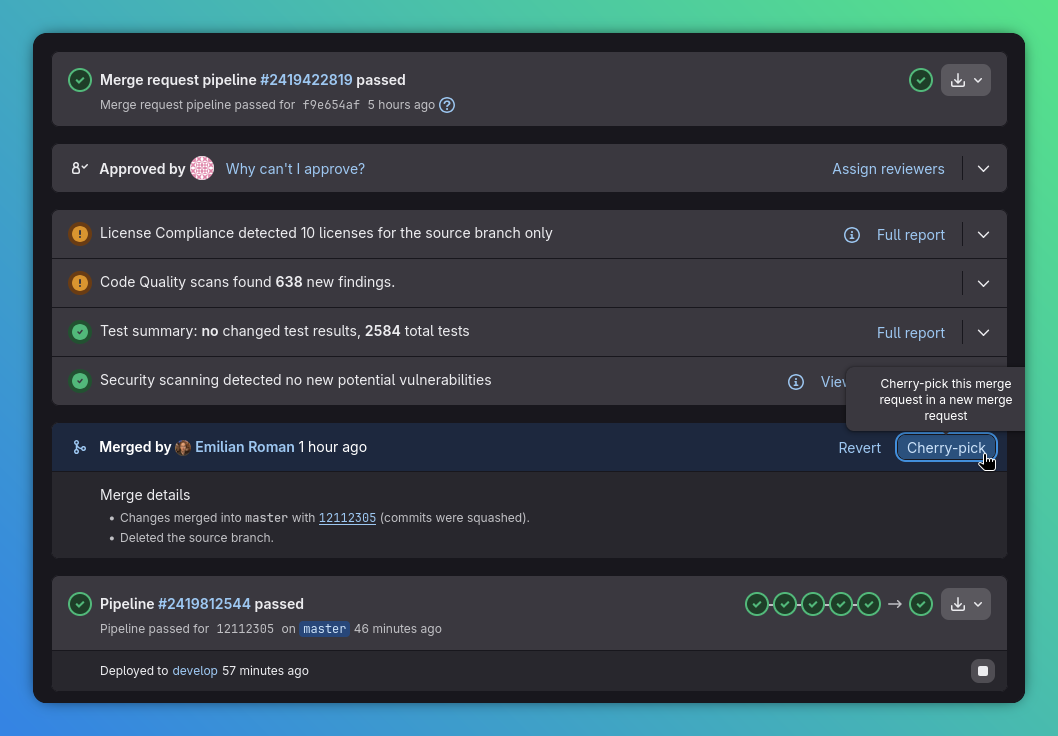
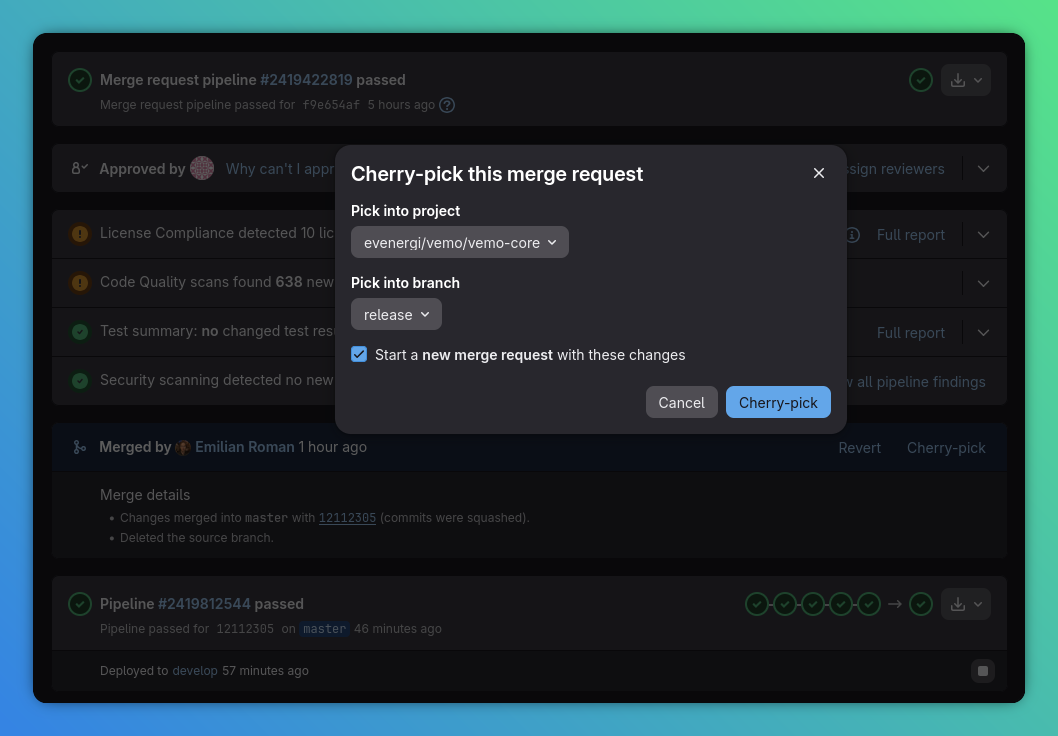
    2. Cherry-pick the merged hotfix into release. Use the GitLab merge request cherry-pick action to apply the merged change to the release branch.
    3. Verify the release branch now contains the intended hotfix. Confirm the cherry-pick succeeded, the target branch is release, and no unexpected extra commits were introduced as part of the promotion.
    4. Create a new orchestration pipeline. Open the shared orchestration pipeline page and start a fresh pipeline with action=deploy-release-branch-to-staging, project=<target repository>, and confirm=true.
    5. Do not choose the cut-off action. bring-all-code-to-release-branch is the normal cut-off path for rebuilding release from the default branch. It is not the correct action for promoting a single staging hotfix.
    6. Watch the target service deployment through to completion. Follow the downstream pipeline, environment page, and service health checks until the staging deployment finishes.
    7. Validate the fix in staging. Run the relevant smoke tests, acceptance checks, or focused manual checks for the hotfix scope. For governed delivery work, add the Validated in Staging merge-request label once the validation passes.

    Reference Screenshots

    These screenshots use one example service and repository. The Run new pipeline image now reflects the current guided action / project / confirm entrypoint.

    Steps 2 And 3: Cherry-Pick The Merged Hotfix Into release

    What To Check Screenshot
    Start from the merged merge request and use the Cherry-pick action. Merged merge request with the Cherry-pick action highlighted
    In the cherry-pick dialog, target the release branch before confirming the promotion. Cherry-pick dialog targeting the release branch

    Steps 4 And 5: Start The Guided Release Invocation

    Use the orchestration pipeline with action=deploy-release-branch-to-staging, project=<target repository>, and confirm=true. The key safety check is to avoid bring-all-code-to-release-branch for a selective hotfix. The screenshot below shows the current Run new pipeline screen with the guided inputs ready for submission.
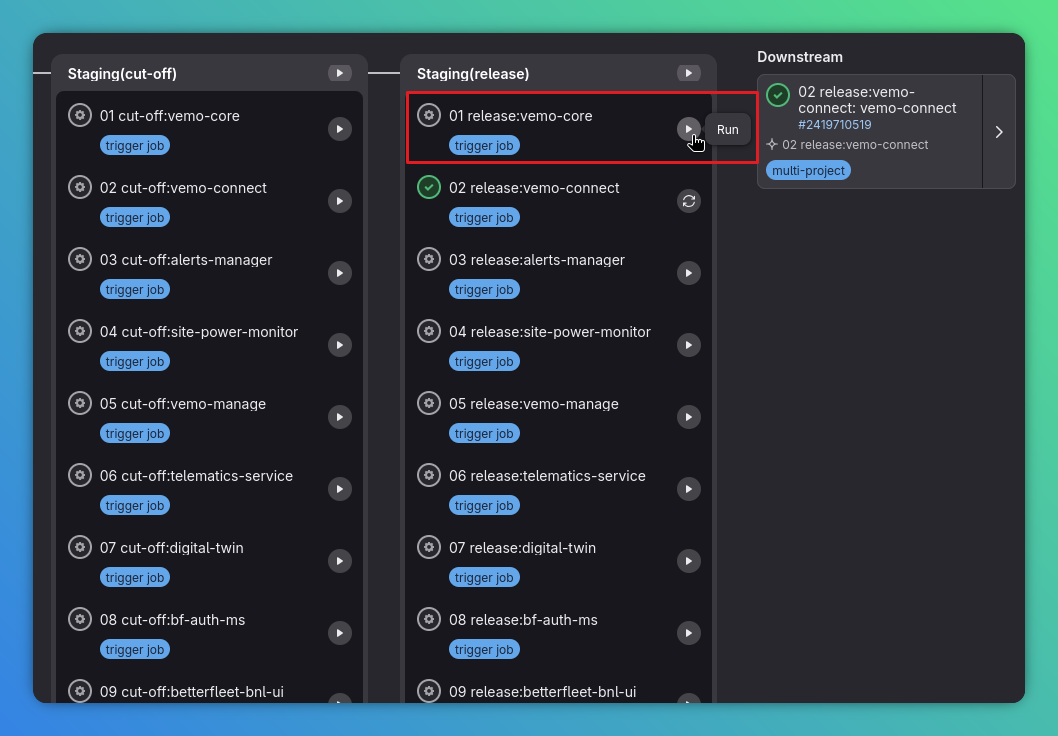
    Run new pipeline screen showing the guided action, project, and confirm inputs

    Steps 6 And 7: Confirm The Staging Deploy And Validate The Result

    Use Operate -> Environments and the target service's own health or smoke checks to confirm staging now points at the intended hotfix deployment.
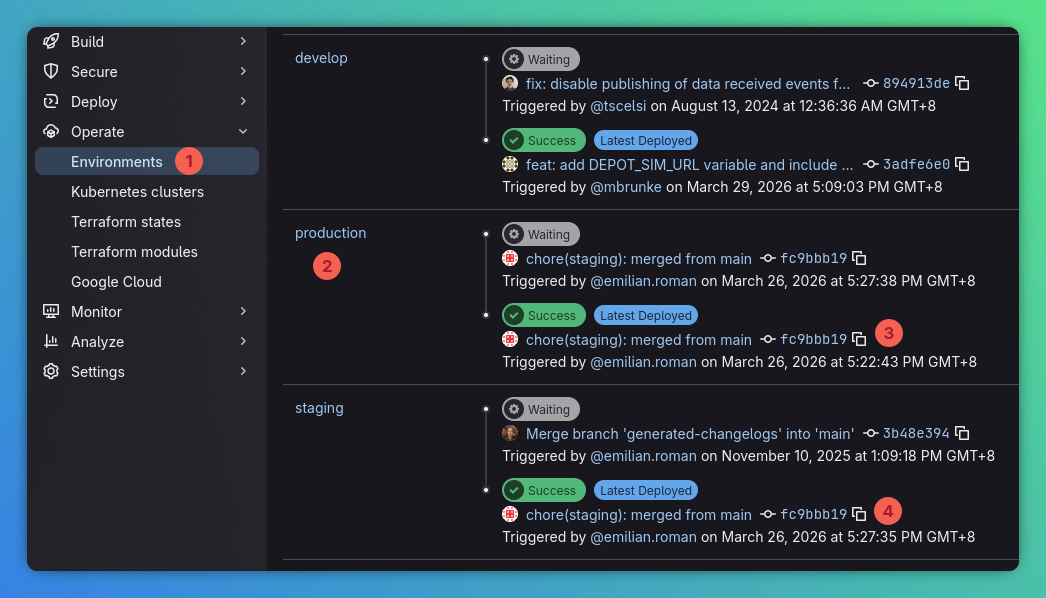
    GitLab environments view showing deployed production and staging entries

    Decision Points And Exceptions

    • If the merge request is not yet merged, or the fix is still changing, stop and complete the normal development and review path first.
    • If the release branch needs a full resync from the default branch rather than a selective hotfix promotion, use the repository's normal cut-off process instead of this runbook.
    • If the cherry-pick conflicts, resolve the conflict on a local release branch, verify the resulting tree, and push only after confirming the final contents are correct.
    • If more than one repository needs the hotfix, repeat the guided release invocation and validation steps for each affected repository and record exactly which targets were promoted.
    • If the service uses different job names, approvals, or downstream pipeline entry points, follow the target repository's service-specific release docs.
    • If staging validation fails, do not proceed toward production. Either revert the hotfix from release or replace it with a corrected hotfix and rerun the staging deploy.

    Validation And Evidence

    Treat the staging promotion as complete only when you can point to evidence for each of these checks:

    • the merged hotfix is present on release
    • the orchestration pipeline used action=deploy-release-branch-to-staging, the intended project, and confirm=true
    • bring-all-code-to-release-branch was not selected for the hotfix
    • the target service's staging deployment completed successfully
    • the staging environment reflects the expected commit or build for the hotfix
    • the hotfix-specific smoke tests or acceptance checks passed
    • the merge request, deployment note, or handover note records what was validated and for which service
    • for governed delivery work, the merge request carries the Validated in Staging label after validation passes

    Rollback And Recovery

    If the hotfix has not yet been deployed, remove or revert the cherry-picked commit from release and stop the promotion.

    If the hotfix was deployed to staging and needs to be backed out:

    • revert the cherry-picked hotfix from release
    • push the corrected release branch
    • rerun the orchestration pipeline with action=deploy-release-branch-to-staging, the same target project, and confirm=true
    • revalidate staging before using that environment for further checks

    If the release branch state is unclear or includes unintended drift, stop and restore it using the target repository's release-branch recovery process before attempting another deployment.

    Links To Service-Specific Details

    • Shared CI and release context: CI and Release Integration
    • Governed staging validation expectations: Product Engineering Delivery
    • BetterFleet service lookup: Service Matrix
    • BetterFleet Manage service docs: Manage Services
    • BetterFleet Plan service docs: Plan Services
    • Target repository details: the target repository's .gitlab-ci.yml, release jobs, environment page, and service-specific operational docs
    Made with Material for MkDocs
    BFDev Docs Assistant
    New conversation?
    Ask one focused question at a time, this helps the assistant provide accurate answers about what's been implemented in BetterFleet.